 DayPilot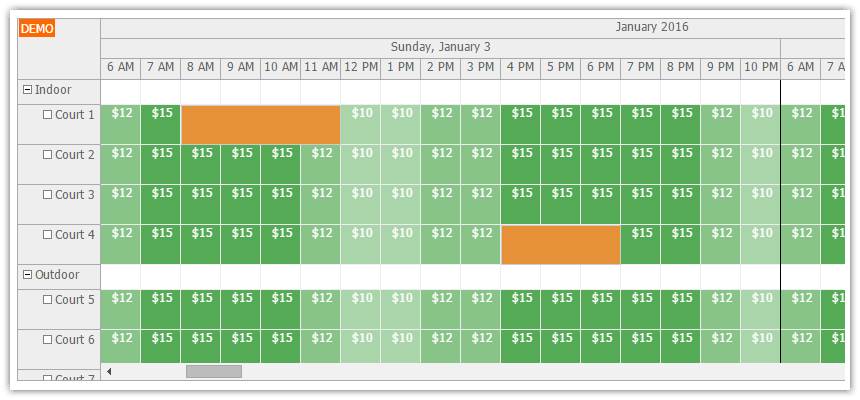
Features
- Multiple tennis courts, grouped by location (indoor, outdoor)
- Public interface for visitors: see available time slots, book a time slot
- Admin interface for staff: see and manage all reservations
- Showing different prices depending on time of day
- Prevents creating reservations in the past
- PHP source code
- SQLite sample database
Source code of the tutorial is available for download.
Example: Displaying Hourly Rate in Grid Cells
This tutorial uses the cell customization feature of the Scheduler to display time slot prices directly in the time cells.
var slotPrices = {
  "06:00": 12,
  "07:00": 15,
  "08:00": 15,
  "09:00": 15,
  "10:00": 15,
  "11:00": 12,
  "12:00": 10,
  "13:00": 10,
  "14:00": 12,
  "15:00": 12,
  "16:00": 15,
  "17:00": 15,
  "18:00": 15,
  "19:00": 15,
  "20:00": 15,
  "21:00": 12,
  "22:00": 10,
};

dp.onBeforeCellRender = function(args) {

  if (args.cell.isParent) {
      return;
  }

  if (args.cell.start < new DayPilot.Date()) {  // past
      return;
  }

  if (args.cell.utilization() > 0) {
      return;
  }

  var color = "green";

  var slotId = args.cell.start.toString("HH:mm");
  var price = slotPrices[slotId];

  var min = 5;
  var max = 15;
  var opacity = (price - min)/max;
  var text = "$" + price;
  args.cell.html = "<div style='cursor: default; position: absolute; left: 0px; top:0px; right: 0px; bottom: 0px; padding-left: 3px; text-align: center; background-color: " + color + "; color:white; opacity: " + opacity + ";'>" + text + "</div>";
};