 DayPilot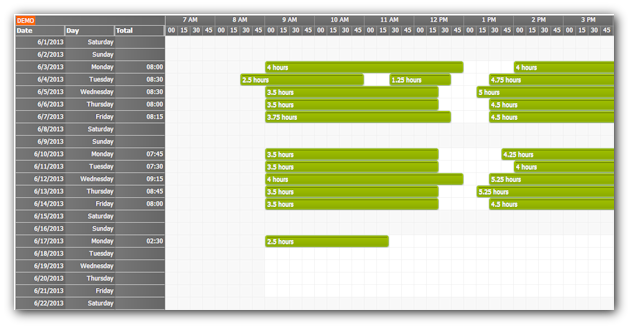
This tutorial shows how to create a monthly time sheet in ASP.NET using DayPilot Scheduler control.
Tutorial
- Tutorial: Timesheet for ASP.NET (C#, VB.NET, SQL Server)
Download
- The tutorial includes a sample Visual Studio project with source code in C# and VB.NET.
Features
- Monthly time sheet
- Highlighting business hours
- Daily totals
- Drag and drop
- Editing using a modal dialog
- C# and VB.NET versions
- Visual Studio project
- SQL Server database
Online Demo
Examples
Daily Totals
<HeaderColumns>
  <DayPilot:RowHeaderColumn Title="Date" Width="100" />
  <DayPilot:RowHeaderColumn Title="Day" Width="100" />
  <DayPilot:RowHeaderColumn Title="Total" Width="100" />
</HeaderColumns>
Employee Filter
Filter DropDownList:
<div class="space">
  Employee:

  <asp:DropDownList
    runat="server"
    ID="DropDownListEmployee"
    ClientIDMode="Static"
    DataTextField="EmployeeName"
    DataValueField="EmployeeId" />
</div>
Applying the filter
<script type="text/javascript">
    $(document).ready(function () {
        dp.clientState.employee = $("#<%= DropDownListEmployee.ClientID %>").val();
        $("#<%= DropDownListEmployee.ClientID %>").change(function () {
            dp.clientState.employee = this.value;
            dp.commandCallBack("refresh");
        });
    });
</script>
Business Hours
<DayPilot:DayPilotScheduler
    ID="DayPilotScheduler1"
    runat="server"

    BusinessBeginsHour="9"
    BusinessEndsHour="18"
>
</DayPilot:DayPilotScheduler>