 DayPilot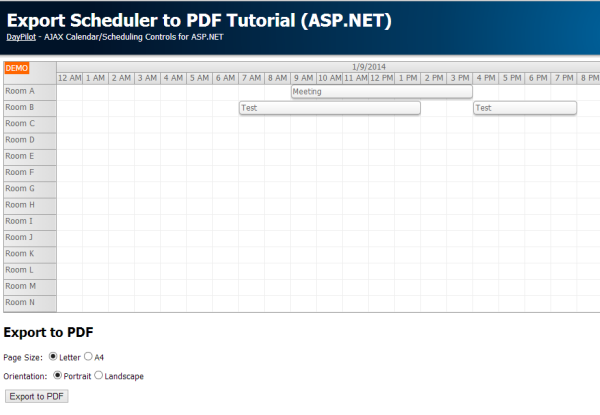
Tutorial:
Features:
- Export to PNG
- Export to PDF
- Customized scheduler appearance (fonts, colors)
- Multiple PDF page sizes (letter, A4)
- PDF page orientation (portrait, landscape)
- Custom PDF page header
- Automatic image scaling to fill the page
- DayPilot Pro for ASP.NET WebForms 7.6 Trial included
- C# source code
- VB.NET source code
- Visual Studio 2010 solution
- Visual Studio 2012 solution
- Microsoft SQL Server database
The tutorial uses PDFSharp library to export the Scheduler view to PDF.
A sample Visual Studio project is available for download.
Sample code (C#):
private void ExportToPdf()
{
  // create a new PDF document
  PdfDocument doc = new PdfDocument();
  doc.Info.Title = "DayPilot Scheduler PDF Export";
  doc.Info.Author = "DayPilot";

  // add a page
  PdfPage page = doc.AddPage();

  // set PDF page properties (size and orientation)
  page.Size = (PageSize) Enum.Parse(typeof (PageSize), ListPageSize.SelectedValue);
  page.Orientation = (PageOrientation)Enum.Parse(typeof(PageOrientation), ListPageOrientation.SelectedValue);

  // create graphics object for PDF page modification
  XGraphics gfx = XGraphics.FromPdfPage(page);

  // write title
  XRect titleRect = new XRect(new XPoint(), gfx.PageSize);
  titleRect.Inflate(-10, -15);
  XFont font = new XFont("Tahoma", 14, XFontStyle.Bold);
  gfx.DrawString("DayPilot Scheduler PDF Export", font, XBrushes.DarkGray, titleRect, XStringFormats.TopCenter);

  // create Scheduler image
  SetDataSourceAndBind();
  SetExportProperties();
  Bitmap bitmap = DayPilotScheduler1.ExportBitmap();

  // add the image to the PDF page
  XImage image = XImage.FromGdiPlusImage(bitmap);
  XRect imageRect = GetPaddedRectForImage(gfx, image, 10);
  double y = 40;
  imageRect.Y = y;
  gfx.DrawImage(image, imageRect);

  // save the PDF file to MemoryStream
  MemoryStream mem = new MemoryStream();
  doc.Save(mem, false);

  // send the output stream to the browser
  Response.Clear();
  Response.ContentType = "application/pdf";
  Response.AddHeader("content-disposition", "attachment;filename=scheduler.pdf");
  mem.WriteTo(Response.OutputStream);
  Response.End();
}