 DayPilot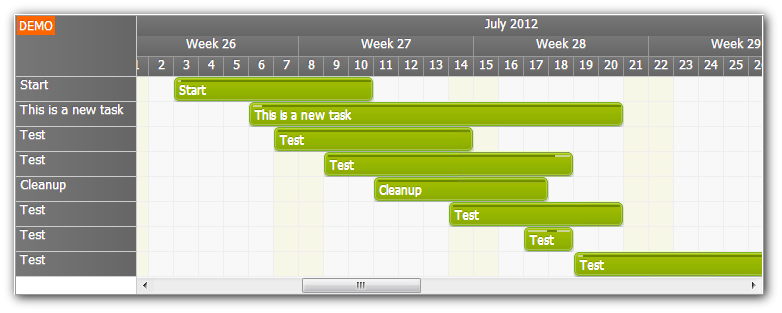
The Gantt Chart tutorial for ASP.NET WebForms was updated.
- Displays one task per row
- Drag&drop task creating using a special row (New Task)
- Drag&drop task moving (restricted to its own row)
- Drag&drop task resizing
- Context menu
- Fast callout with task details (bubble)
- Task detail editing using a modal popup
- Automatic row header width adjustment
- Visual Studio 2012 solution
- Visual Studio 2010 solution
- Microsoft SQL Server database
- C# source code
- VB source code
The tutorial includes the latest DayPilot Pro for ASP.NET WebForms Trial (7.6 SP1).
Sample configuration:
<DayPilot:DayPilotScheduler
  ID="DayPilotScheduler1"
  runat="server"
  DataEndField="TaskEnd"
  DataStartField="TaskStart"
  DataTextField="TaskName"
  DataValueField="TaskId"
  DataResourceField="TaskId"
  Days="7"
  CellDuration="1440"
  EventMoveHandling="CallBack"
  ContextMenuID="DayPilotMenu1"
  OnEventMenuClick="DayPilotCalendar1_EventMenuClick"
  EventResizeHandling="CallBack"
  OnEventResize="DayPilotCalendar1_EventResize"
  OnEventMove="DayPilotCalendar1_EventMove"
  TimeRangeSelectedJavaScript="timeRangeSelected(start, end, resource);"
  TimeRangeSelectedHandling="JavaScript"
  EventClickHandling="JavaScript"
  EventClickJavaScript="eventClick(e);"
  ClientObjectName="dp"
  EventDeleteHandling="JavaScript"
  OnEventDelete="DayPilotCalendar1_EventDelete"
  OnCommand="DayPilotCalendar1_Command"
  ShowEventStartEnd="false"
  OnBeforeEventRender="DayPilotCalendar1_BeforeEventRender"
  EventHeight="25"
  Width="100%"
  AfterRenderJavaScript="afterRender();"
  CssOnly="true"
  CssClassPrefix="scheduler_green"
  HourNameBackColor="#F0F0F0"
  onbeforecellrender="DayPilotScheduler1_BeforeCellRender"
  OnBeforeTimeHeaderRender="DayPilotScheduler1_BeforeTimeHeaderRender"
  RowHeaderWidth="120"
  RowHeaderWidthAutoFit="true"
  DurationBarVisible="true"
  HeaderHeight="20"
  CellWidth="25"
  BubbleID="BubbleEvent"
  ViewType="Resources"
  ShowToolTip="false"
/>