 DayPilot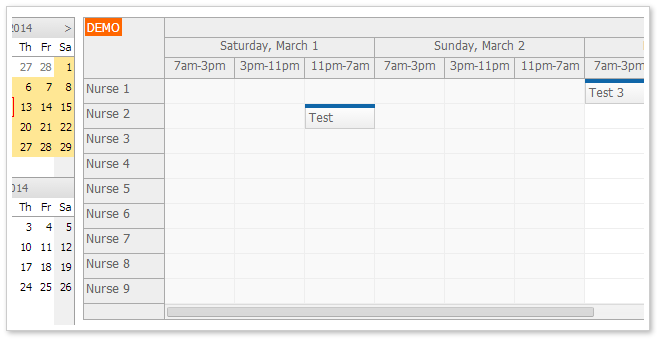
Tutorial:
Features:
- 3 shifts per day (7am - 3pm, 3pm - 11pm, 11pm - 7am)
- Time headers grouped by day and month
- Highlighting weekend shifts
- Displaying nurses on the vertical (Y) axis
- Displaying the timeline on the horizontal (X) axis
- SQL Server database
C# sample that creates a custom timeline with shifts:
protected void Page_Load(object sender, EventArgs e)
{
  if (!IsPostBack)
  {
      LoadTimeline(DateTime.Today);
  }
}

private void LoadTimeline(DateTime date)
{
  DayPilotScheduler1.StartDate = date; // required for later refreshes (will be persisted)
  DayPilotScheduler1.Scale = TimeScale.Manual;

  const int firstShiftStartHour = 7; // first shift starts at 7 am
  const int shiftDurationHours = 8; // one shift takes 8 hours

  DateTime firstDayOfMonth = new DateTime(date.Year, date.Month, 1); // first day of month
  int days = DateTime.DaysInMonth(firstDayOfMonth.Year, firstDayOfMonth.Month);
  DateTime start = firstDayOfMonth.AddHours(firstShiftStartHour);
  DateTime end = firstDayOfMonth.AddDays(days);

  while (start < end)
  {
      DayPilotScheduler1.Timeline.Add(start, start.AddHours(shiftDurationHours));
      start = start.AddHours(shiftDurationHours);
  }
}
The source code of the sample application is available for download.